The 5 Jobs a Stadium Incident Management System (IMS) Needs to Do: A Practical Buying Guide
Quick Links
A stadium incident management system (IMS) has to earn its place in the control room.
If it slows reporting down, creates another place for you to check, or only produces useful information after the event, it will not last long. Your team will default back to radio, paper, spreadsheets, WhatsApp, or whatever gets the job done fastest.
That does not mean manual tools are always better, just a comfortable default for many of us. It shows us that the system you choose has to fit the pace and structure of your operation.
This buying guide is for stadium and venue teams reviewing how they manage their daily and event-day tasks, incidents, monitoring and reporting. It applies whether you are moving away from manual processes, replacing a system that no longer works for you, or adding capability around public reporting, audit trails, task management or live dashboards.
Because the right system should be judged by the jobs it performs during live operations, not by the length of its feature list.
This guide covers:
- How to prepare for the buying process before speaking to suppliers
- The five jobs a stadium security management system needs to do
- The specific features and functionality to look for
- Comparing systems and what questions to ask during demos and procurement
- How to assess system fit for your venue, teams and existing workflows
Before You Compare Systems: Prepare the Buying Process Properly
The incident management system (IMS) you choose will affect more than the security team.
It will touch the control room, safety team, stewarding provider, contractors, guest services, medical provision, cleaning, facilities, IT, data protection, procurement, finance and senior leadership. In some venues, it may also affect how information is shared with police, local authorities, Safety Advisory Groups and other event partners.
But that still doesn’t mean everyone will have the same exact requirements, and to avoid wasting time and money on lengthy onboarding, staff training and teething problems only to find that the system you purchased isn’t for you, its better to get it right the first time around. The more you prepare your buying process, the more successful it will be in helping you decide the best system for you.
Start by defining the problem
Before speaking to suppliers, be clear about what is driving the review.
If you don’t already have a dedicated IMS, the issue may be that incident information is spread across radio logs, paper forms, spreadsheets, emails and post-event recollection.
If you’re replacing a system or systems, the issue may be poor adoption, slow reporting, weak dashboards, limited customisation, poor supplier support, lack of public reporting, or reporting that still requires manual collation.
Or, if you’re looking to add capability to your existing processes, the issue may be more specific: public reporting, multi-agency access, task management, audit trails, location mapping, offline use or better dashboards.
Useful starting questions include:
- Where does incident information currently start? Is it early enough?
- Who receives it first? And in what form?
- Where is it recorded?
- Who updates it?
- How are actions assigned?
- How are decisions logged?
- How are public reports received?
- How are contractors/3rd parties included?
- How long does post-event reporting take?
- What cannot be evidenced easily after the event?
By establishing what your pain points are and defining what your incident management system needs to achieve, you can more productively compare suppliers’ offerings.
Identify your stakeholders early
A common buying mistake is involving operational users too late, or allowing non-operational stakeholders to dominate the requirements.
A good process usually separates stakeholders into four groups:
Decision-makers: budget holders, senior leadership, procurement.
System owners: head of security, safety officer, operations lead, control room manager.
Users: stewards, supervisors, contractors, medical, cleaning, facilities, guest services.
Assurance stakeholders: IT, data protection, legal, compliance, SAG-facing teams.
Each group needs different evidence.
Senior leadership may need risk reduction, reporting value and business case clarity. Control room teams need usability and operational fit. IT needs cyber, hosting, integration and access control detail. Data protection needs clarity on roles, permissions, retention and data ownership. Procurement needs value, implementation plans and supplier credibility.
By knowing early on who will need what information, you can be sure to gather this as quickly as possible and build an effective business case.
Define a realistic first phase requirements
Avoid trying to solve every problem on day one. A strong first phase for a stadium often includes:
- Live incident reporting
- Control room dashboard
- Matchday task checks
- Team functionalities
- Public reporting route
- Post-event reporting
- Digital audit trail
Additional capability can follow once adoption is established.
Get ready to test with real stadium scenarios
Do not accept a generic demo.
Ask suppliers to demonstrate scenarios that reflect your operation:
- A public report of discriminatory abuse that is simple and accessible
- A medical incident that can be shared with 1 or more teams
- A recurring task like pre-event checks
- An adhoc task like an out-of-schedule toilet check
- A disorder incident requiring police liaison/3rd party system sharing
- A missing child or vulnerable person workflow
- A failed pre-opening safety check
- A post-event SAG report
- Ad hoc task creation
- A busy match day with multiple live dashboards
The question is not “can the system do incident reporting?” It’s “can it support the way we actually run?”
The 5 Jobs Your Security Management System Needs to Do
Job 1: Capture Live Information From the People Closest to the Incident
The first job of an incident security management system is to make live reporting fast, accurate and usable.
If a steward, supervisor, contractor or response team cannot report quickly from wherever they are, the system will not become part of the operation. It will become something people update later.
The need
Frontline teams are usually closest to the earliest signs of an issue. They see the spill, the blocked route, the crowd tension, the medical concern, the abuse, the suspicious behaviour, the damaged barrier, the lost child, the refusal of entry.
The system needs to help them capture that information with enough structure for control to act on it.
That does not mean long forms. It means the right forms.
What to look for
A suitable system should include:
- Mobile incident reporting
- Simple forms for frontline use
- Custom forms to adapt to your
- Mandatory fields for critical information
- Photo, video and document uploads
- Time and date stamping
- Location tagging by stand, block, gate, concourse, fan zone, car park or external footprint
- Ability to update existing incidents
- Offline mode for low-signal areas
- Push alerts and reminders
- Access to key documents, procedures and aide memoires
Offline capability can be a real bonus for venues with weak connectivity in service areas, back-of-house spaces, lower concourses, temporary structures or external areas. If the system stops working when signal drops, it will not support live operations properly. Be sure to test this properly and ensure the focus is on preserving the audit trail.
What to avoid
Be cautious of systems that:
- Require too many clicks to submit a basic report
- Use the same form for every incident type
- Cannot capture photos or videos directly
- Depend on perfect signal
- Require control room staff to re-key frontline reports
- Make it difficult to update an incident once created
- Use generic location fields that do not match the venue
Buying questions to ask
- Can frontline users submit a report in under 60 seconds?
- Can different teams have different forms?
- Can forms be changed without supplier development?
- Can users add photos, videos and notes from the scene?
- Can the system prevent missing critical information (like with required fields)?
- Can it work offline?
- Can temporary, contractor or agency users access only what they need?
- Can reports be triaged before wider sharing?
Demo test
Ask the supplier to demonstrate incident reporting workflow by showing a steward logging anti-social behaviour from a mobile device, including stand/block location, image upload, priority level, control room notification and follow-up update.
Job 2: Give the Control Room a Usable Live Picture
The second job is turning incoming reports into a live operational picture.
Collecting information is not enough. The system has to help control room teams understand what is active, what is escalating, who owns each action and where pressure is building.
The need
A control room may have plenty of information but still lack clarity.
That usually happens when incidents, tasks, updates and team activity sit in separate places. Radio carries one version. A spreadsheet carries another. Contractor updates sit somewhere else. Public reports arrive through a different channel. By the time the post-event log is assembled, the live opportunity has gone.
An incident security management system should help control manage live work, not simply store records.
What to look for
A strong control room view should include:
- Live incident dashboard
- Incident status tracking
- Priority and severity levels
- Filters by location, team, category, status, owner etc
- Map or site-plan view
- Task and incident visibility in the same environment
- Assignment and reassignment of actions
- Live updates and notifications
- Escalation functionality
- Complete (automated and manual) activity log
- Multi-dashboard mode for different teams, logs or operational areas
- Full overview/control dashboard
Multi-dashboard management is particularly useful for larger venues. Security, safety, medical, facilities, cleaning, guest services and senior command may each need different views, while control still needs overall visibility.
What to avoid
Be cautious of systems that:
- Show incidents as a list but not as an operational picture
- Cannot filter quickly by type, zone or team
- Separate incidents and tasks completely
- Require manual refreshes or exports to see trends
- Do not show ownership clearly
- Do not show what has changed since the last update
- Create dashboards that look useful in management reports but not during live operations
Buying questions to ask
- Can control see all active incidents in real time?
- Can incidents be filtered by zone, category, owner, severity etc?
- Can tasks and incidents be viewed together?
- Can users assign and reassign actions from the dashboard?
- Can different teams have different dashboards?
- Can senior leaders have a real-time overview?
- Can control manage multiple logs or event areas at once?
- Can the system show real-time reports and/or analytics during the event?
Demo test
Ask the supplier to show all live incidents in one zone, filter them by severity, reassign someone, update the status, and show how that appears on the control dashboard and on mobile.
Job 3: Coordinate Multiple Teams Without Losing Control
The third job is multi-team coordination.
Most stadium operations involve several teams, and not all of them should see the same information. The system needs to support collaboration without creating uncontrolled access.
The need
Security and incident management is rarely contained within one team. A single incident can involve stewards, control, police liaison, medical, safeguarding, guest services, cleaning, facilities and senior leadership.
Without proper multi-team functionality, venues often rely on workarounds: WhatsApp groups, radio relays, email chains, separate contractor spreadsheets or duplicated logs.
Those workarounds are familiar, but they create problems. Sensitive information can be overshared. Updates can be missed. Teams can duplicate actions. The audit trail becomes fragmented.
What to look for
An incident management system designed for multi-team use should include:
- Multiple teams and departments
- Role-based access control
- Team-based permissions
- Team-specific dashboards
- Team-specific logs
- Multi-agency logging
- Controlled sharing between teams
- Ability to tag users, teams or agencies
- Read-only access for observers
- Secure sharing of images, descriptions and updates
- Full record of who created,, observed, updated and closed an item
This is especially important for incidents involving medical details, safeguarding, arrests, ejections, intelligence, suspicious items, vulnerable persons or police activity.
What to avoid
Be cautious of systems that:
- Treat all users as one general group
- Require separate systems for contractors
- Cannot control who sees what
- Make it difficult to share one incident with selected teams
- Do not show who owns each action
- Cannot remove/restrict temporary or agency users quickly
- Rely on external messaging apps for updates
Buying questions to ask
- Can different teams have different views?
- Can contractors access only their tasks or incidents?
- Can one incident be shared with selected teams only?
- Can sensitive categories be restricted/controlled?
- Can team dashboards be configured separately?
- Can control retain oversight across all teams?
- Can the system support police, medical or local authority observer access if required?
- Is every user action auditable?
- Are there different levels of user types e.g Admin and User?
Demo test
Ask the supplier to show how a public report of discriminatory abuse would be received, triaged, restricted, shared with the relevant team, updated by control and exported later for review.
Job 4: Fit the Way Your Venue Actually Works
The fourth job is flexibility.
An incident management system needs enough structure to maintain standards, but enough flexibility to reflect the venue’s actual operation.
The need
A football stadium, cricket ground, rugby stadium, racecourse, arena and motorsport venue may all need incident management, but they do not operate in exactly the same way.
Even within one venue, workflows change by event type. A league fixture, international event, concert, high-risk fixture, corporate event and community day may each involve different teams, zones, incident types, checklists and escalation routes.
If the system cannot flex, teams will work around it.
What to look for
A flexible incident management system should include:
- A simple but flexible form builder e.g drag and drop
- Custom incident types
- Custom task types
- Custom fields
- Mandatory fields
- Conditional questions
- Custom in-system labels
- Bespoke site mapping
- Zones within zones
- Custom dashboards
- Configurable reports
- Document/file library
- Ability to change, create and delete customisations without long supplier development cycles
Location flexibility is particularly important. Stadium teams may need to filter incidents by stand, block, row, vomitory, concourse, search lane, hospitality suite, car park, fan zone, transport interface or external footprint.
What to avoid
Be cautious of systems that:
- Force every venue into the same incident categories
- Require supplier support for every small form change
- Cannot reflect your location structure
- Cannot create event-specific forms
- Make forms so generic they lose operational value
- Overly complex customisations
Buying questions to ask
- Does the system come with any standard forms?
- Can we build and edit our own forms?
- Can we create custom incident and task types?
- Can we create mandatory fields and conditional questions?
- Can locations be configured to match our stadium?
- Can we create zones within zones?
- Can dashboards be configured/edited/moved around?
- Which changes can we make ourselves?
- Which changes require supplier support?
- How long does initial configuration usually take?
Demo test
Ask the supplier to build a custom “Ejection / Refusal of Entry” form live during the demo. Include fields for location, reason, steward ID, police involvement, body-worn video reference, safeguarding concern, image upload and notes/free text.
Job 5: Create a Defensible Record for Review, Compliance and Improvement
The fifth job is auditability.
After the event, your incident management system needs to show what happened, when it happened, who knew, what action was taken, and what evidence supports the record.
The need
If the venue has to reconstruct the timeline from paper logs, radio traffic, WhatsApp messages, emails, spreadsheets and memory, the record is already compromised, which can cause real issues for serious incidents, complaints, safeguarding concerns, medical events, disorder, insurance queries, civil claims, police enquiries, internal investigations and SAG debriefs.
Without a un-tamperable, re-traceable, defensible audit trail, you can open up your teams and organisation to stakeholder scrutiny, fines and even legal ramifications.
What to look for
A defensible system should include:
- Automatic time and date stamps
- User attribution for every entry
- Full incident chronology
- Action/update log
- Linked tasks and incidents
- Evidence attachments
- Activity history
- Secure report exports
- Analytics by time, location, type, event, team etc
- Debrief functionality
- Custom reports
- Data retention controls
- Clear data ownership and hosting arrangements
What to avoid
Be cautious of systems that:
- Can export a report but cannot show a reliable timeline
- Do not attribute updates to individual users
- Cannot link tasks and/or incidents
- Store evidence outside the incident record
- Require manual spreadsheet work for every review
- Cannot present trends
- Do not have sufficient access control e.g SSO, MFA
- Make it difficult to retrieve historic information
Buying questions to ask
- Is every update time and date stamped?
- Can we see a full timeline for each incident?
- Are actions and decisions shown for incidents?
- Can evidence be attached directly to the record?
- Can tasks be linked to incidents? Can 2 or more incidents be linked/merged?
- Can reports be exported without manual collation?
- Can we analyse by location, event type, team, category and outcome?
- Can sensitive information be restricted or redacted?
- Where is our data stored?
- Who owns the data?
- What happens to our data if we leave the supplier?
Demo test
Ask the supplier to generate a post-event report showing incidents by location, category, event, assigned team and outcome. Then ask them to open one incident and show the full timeline, evidence, updates and actions.
Comparing Incident Management Systems: A Practical Buying Framework
Once you’ve had a demo of each system, it’s time to compare them by operational fit. Here’s a handy table to keep track:
| Buying area | What to assess | What to ask |
|---|---|---|
| Frontline adoption | Will staff use it during a live event? | Can a report be submitted quickly from mobile, including photos and location? |
| Control room value | Does it improve live decision-making? | Can control see active incidents, tasks, owners and priorities in real time? |
| Multi-team use | Can teams work together without losing control? | Can dashboards and sharing be controlled by team or role? |
| Flexibility | Can it fit your venue and event types? | Can you build custom forms, categories, locations, events/Logs and reports? |
| Auditability | Can it evidence what happened? | Are actions, updates, decisions and evidence time-stamped and exportable? |
| Implementation | Can you go live without overwhelming users? | What does onboarding, training and configuration look like? How user-friendly is it? |
| Migration | Can it replace or sit alongside existing tools? | What happens to historic data, current processes and existing reports? |
| Support | Does the supplier understand live operations? | Who supports configuration, go-live and post-launch improvement? How easy is it to access ongoing support? What is the technical support process and response time like? |
| Data governance | Can IT and data protection sign it off? | Where is data hosted, who owns it, and how is access controlled? What technical requirements are there (whitelisting, APIs etc) |
| Long-term fit | Will the system grow with the operation? | What is the roadmap, and how are customer needs prioritised? |
Advice for Teams Buying Their First Security Management System
For teams moving away from paper, spreadsheets, radio-only records or informal messaging, the biggest risk is trying to digitise too much too quickly.
Start with the processes that create the most risk or manual effort.
Usually, that means:
- Live incident reporting
- Control room visibility
- Matchday/pre-event checks
- Public reporting
- Contractor/agency access
- Post-event reporting
- Audit trail
Map the current process first. Then decide what should be kept, what should be simplified, and what should stop altogether.
A first system should not just recreate the old process on a screen. It should reduce duplicated work, improve visibility and make the record stronger.
Advice for Teams Replacing or Upgrading an Incident Management System
For teams already using a system, the buying process should start with a clear gap analysis.
Common reasons to replace or upgrade include:
- Poor frontline adoption
- Too many clicks to log incidents
- Poor mobile experience
- Limited custom forms
- No offline mode
- Poor reporting
- Limited dashboards
- Inadequate customisations
- No public reporting
- Poor supplier support
- Too much admin to configure or maintain
- Lack of fit across both daily and event-day operations
Before changing supplier, be honest about whether the issue is the platform, the configuration, the rollout, or user behaviour.
A good replacement process should include:
- Review of current processes
- User feedback from control and frontline teams
- Reporting gap analysis
- Permission model review
- Data migration plan
- Pilot event
- Training plan
- Go-live support
- Post-launch review after the first few events
If the existing system has failed because it was too complex, do not replace it with another complex system. If it failed because it was too rigid, prioritise configuration. If it failed because frontline teams never adopted it, test mobile reporting properly before buying.
What a Good Stadium Incident Management System Looks Like
A good stadium incident management system should feel like part of the operation.
It should help a steward report quickly, a supervisor update clearly, control assign confidently, teams share securely, and senior leaders review evidence without manual reconstruction.
It should reduce radio clutter, not create extra admin.
It should improve situational awareness, not become another screen nobody trusts.
It should fit the venue’s structure, not force the venue into generic workflows.
It should produce a defensible record without relying on someone to piece the day together afterwards.
The real buying test is simple:
Can this system perform the five jobs during live operations, with the people, pressure and constraints we actually have?
Introducing: The Halo System
Halo is designed around these five operational jobs: live reporting, control room visibility, multi-team coordination, flexible configuration and audit-ready reporting.
The Halo System brings together mobile reporting, live dashboards, custom forms, multi-team access, public reporting, task management, mapping, offline mode, reporting and analytics into one connected platform for venues, stadia, arenas and other high-pressure public environments.
For stadium teams comparing incident management systems, Halo is best assessed in the same way any system should be assessed: against real matchday scenarios, real team structures, real reporting pressures and the practical question that matters most:
Will this help us run safer, clearer and more defensible operations when the venue is live?
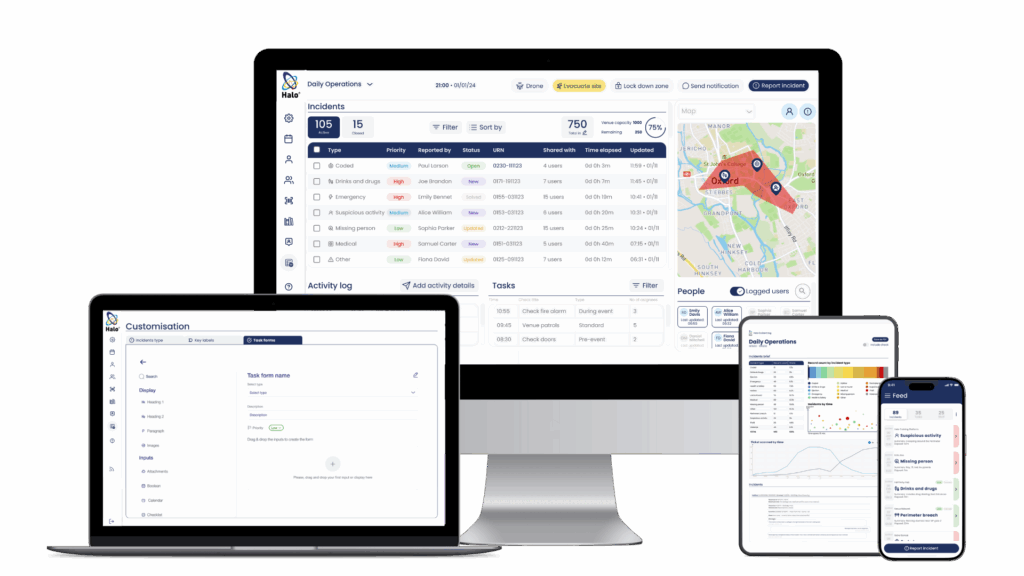
Try it out today with a personalised demo, and ask us about our free and extended system trials
“Halo allowed me to keep my security plans discreet yet offered me the oversight to see what was going on across 10 cities at the same time. The app was a superb choice for the Cricket World Cup 2019.”
See how Halo helped protect over 1.5 million fans during 2019s ICC Cricket World Cup
